Home Server
I run a home server I call nousowl—a small, headless Fedora box for the parts of my work that belong on my own hardware. In quarters when I’m teaching logic it tilts heavily toward curriculum development: a private Carnap instance where I stage assignments before students see them. I write the Carnap files in my editor, deploy them with one command, and watch them render in the browser as the interactive, self-checking problems students actually meet—something like an Overleaf for developing Carnap files. The rest of what it does runs year-round: Sylloge – a journal-tracking tool of my own – a small private Zulip chatroom, and the static site it serves. All of it doubles as my testbed for self-hosting. The server keeps its own page, which says far more than I would here: nousowl.net.
Configs & Automation
Many of my configuration files and scripts live in my public configs repository. The idea is to keep my whole working environment – shell, editor, window manager, terminal, even my LaTeX macros – as version-controlled text in one place, rather than hand-tuning each machine. GNU Stow handles the install, symlinking each piece into the spot its program expects, so a freshly set-up machine becomes “mine” with a clone and a few commands. Some of it is Linux- or Fedora-specific, and the READMEs try to flag what’s what—as much for my own future reference as for anyone else.
Linux
The approximate story of my Linux journey, as seen on and saved from Twitter years ago:
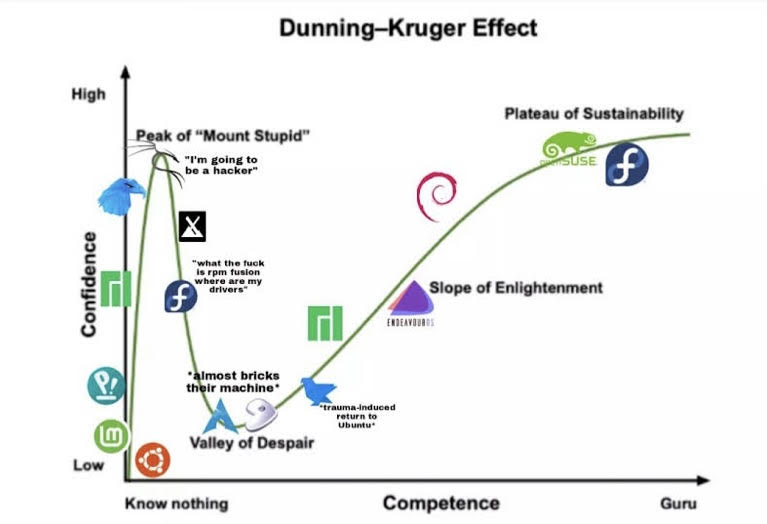 I began experimenting with Linux before Pop was a thing, and although Manjaro existed I never heard of it until much later; and there are some others there that I couldn’t identify by the logo. But it’s true that I began with Ubuntu, which at the time was the premier desktop distribution, a title I think has since passed to Fedora. For me, the peak of Mount Stupid was indeed Kali and Qubes, and the Valley of Despair was indeed Arch. I ultimately made my way back through Lubuntu – which I loved before LXQt replaced LXDE – and then Debian – which is still too bare and backwards for many nice features – finally converging back on Fedora, the greatest balance of all the things you could ever ask for in a desktop distribution. When people tell me they’re interested in using Linux, I tell them to use Fedora and never stop using Fedora.
Although I do continue to have nagging thoughts that Arch is The Way. It probably is – it’s certainly the most fun – but it’s a time-sink. I used to have dreams of making my own personalized Arch distribution—but no. Lots of scripts and total distribution-independence is the way. I think this is what most fascination with Arch is, really: the desire for total distribution-independence.
Preferred Applications
- Editor: Neovim. My configuration can be found here. I’ve done a bit configuring Emacs, too, but I honestly got addicted to the keystrokes when I started using Neovim—and to the way it stays one piece of the Unix pipeline, so that the window manager manages windows, the terminal is the terminal, and the editor just edits. See here for more details. I use VimTeX for LaTeX, but I’m extremely partial to my own completion: snippet libraries generated from TeXstudio’s completion word lists and from my own macro packages, one library per package and loaded only for the packages a document actually uses, so that every command expands with its arguments laid out as placeholders. There is no language server in the loop—TexLab offers bare command names, which defeats the point. I have some other nice plugins for other purposes, too.
- Desktop Environment: GNOME and Sway (the Wayland successor to i3), side by side, on both of my machines. I love both and have a hard time seeing myself choosing outright. GNOME is what MacOS’ desktop should be, and the out-of-the-box Fedora Workstation experience is too good; I am fond of the whole GNOME project, desktop and applications alike, which I think is the best of its kind. Sway is just awesome in that I can do so much without ever touching the mouse or trackpad; most of my workflows run perfectly in it, and I often use it simply because it is so fluid, but some need GNOME to feel fluid.
- Terminal Emulator: Ghostty. I used WezTerm until the Summer of 2026, when I benchmarked the two against each other (findings here): Ghostty repaints faster and stays responsive while output streams, by a margin that no configuration closes. WezTerm stays installed, one keystroke away, mostly to keep tabs on the alternative so that I do not become too partial; it helps that I like the people behind both, Mitchell Hashimoto and Wez Furlong. I have also experimented with Alacritty, an excellent minimal terminal, although it is too minimal for me.
- PDF Viewer: Okular, KDE’s PDF viewer: probably the best Linux has to offer, and very good, although it sometimes feels clunky, as many KDE applications do. I am a GNOME person at heart, and much preferred Evince, GNOME’s old viewer, which was so clean and fast; but it never worked right with LaTeX and SyncTeX, whereas Okular did, and that is what drove me to Okular. I would go back to GNOME’s viewer and engineer my SyncTeX solutions there as I have in Okular, but that viewer since 2025 is Papers, a fork of Evince I have never used, which dropped SyncTeX support in 2024 and, as of its 2026 releases, has not restored it. So that waits on GNOME, not on me.
- Diff and Merge GUI: Meld. This is useful to me not so much for managing code but for managing article drafts that were forked for various reasons. Meld over KDiff3 is, once again, the GNOME application over the KDE one.
- Email, cloud storage, VPN, password manager: Proton. I pay the $100/year or whatever. Proton is awesome. You get what you pay for. Read about its history here. I read my mail in the browser; a desktop client is just an unnecessary layer of complexity where a browser is available.
Honorable Mentions: I occasionally use LibreOffice applications – especially Calc (which is like Google Sheets or Excel) – which actually is fairly good software. I can’t imagine anything Microsoft Word or Google Docs has over LibreOffice other than cloud integration—and since Proton added a spreadsheet of its own, there is less and less reason for it. Although I’m not big into editing photos, I do end up in GIMP from time to time. It might feel lacking next to editors with AI integration, but for my purposes it’s entirely adequate; in fact, I’ve never found a limitation in GIMP.
Of My Own: Sonnerie, a GNOME Shell extension that is a metronome for hours rather than minutes: a click at an interval through the waking day and a woodblock on the hour—a grandfather clock for the top bar. I wrote it because I love metronomes. I am a percussionist of some sort, a kind of time-keeper, and I like a metronome that counts not only beats per minute but beats per hour and per day, to be cute. It keeps me connected to the passage of time, which matters to me; it is easy to forget to look at clocks, and I suspect the same reasoning stands behind grandfather clocks. It is not in GNOME’s extension catalogue, by choice, but it works, I use it constantly, and I love it.